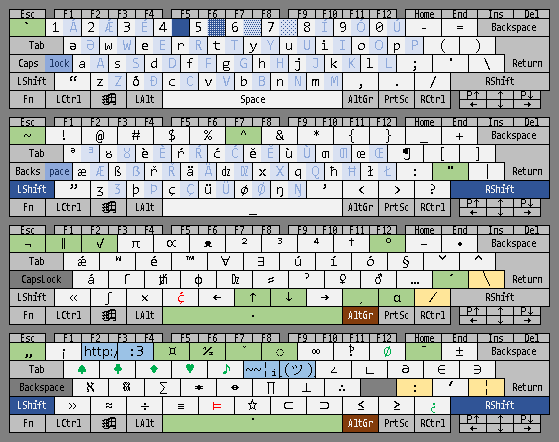
aesign's personal pkl layout
A downloadable keyboard for Windows
Description
this is a program made with PKL (Portable Keyboard Layout: sourceforge, github). please comment if you have any issues with it or if you have any suggestions for it!
Layout
Default && Default+Capslock
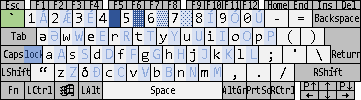
`  1Á 2Ǽ 3É 4█ 5▓ 6▒ 7░ 8Í 9Ó 0Ú -  =
   əƏ wW eE rR tT yY uU iI oO pP (  )
   aA sS dD fF gG hH jJ kK lL ;  '  \
   “  zZ ðÐ cC vV bB nN mM ,  .  /
Shift && Shift+Capslock
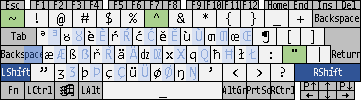
~  !  @  #  $  %  ^  &  *  {  }  _  +
   ᵊᴲ ᴕȢ èÈ ŕŔ ćĆ ĕĔ ùÙ ƣƢ œŒ ¶  [  ]
   æÆ ßẞ řŘ äÄ dzDZ xX qQ ħĦ łŁ :  "  |
   ”  ʒƷ þÞ çÇ üÜ øØ ŋŊ ’  <  >  ?  _
AltGr
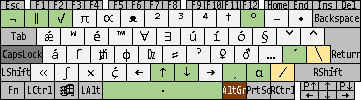
¬  ∥  √  π  ∝  ᴥ  ²  ³  ⁴  †  °  –  •
   ǽ  ʷ  é  ™  ∀  ∃  ú  í  ó  §  ˅  ˄
   á  ſ  ᵺ  ɸ  Dz  ⸗  ˀ  ♀  ♂  …  ´  ╲
   «  ∫  ×  ḉ  ←  ↑  ↓  →  ¸  α  ∕  ·
AltGr+Shift
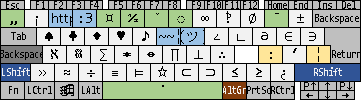
„  ¡  $a $b ¤  ½  ˇ  ◌  ∞  ‽  ∅  ¯  ±
   ♠  ♣  ♦  ♥  ♪  $c $d ∠  ∟  ∂  ∈  ∋
   ℵ  𓆣  ∑  ✶  ↔  ∏  ⊥  ∴     ꞉  ʹ  ¦
   »  ≈  ÷  ≡  ⊨  ☆  ⊂  ⊃  ≤  ≥  ¿  ˙
DeadKeys
(organised by layer, row, and order of occurrence)
Default:  `
Shift:  ~  ^  "
AltGr:  ¬  ∥  √  °  ´  ↑  ↓  ¸  α  ·
AltGr+Shift:  „  ¤  ½  ˇ  ◌  ¯  ˙
Strings
(denoted in the layout text by $+letter)
$a = http://wikipedia.org/wiki/
$b = :3
$c = ~~¦ᵢ|¦__ᛌ__~~
$d = ¯\_(ツ)_/¯
Deadkey Combinations
show/hide section
the deadkeys (wikipedia article here) are əuite convoluted, but help images for the first five are included in the program with more following in subseəuent updates.
dk´ acute | duplication (1) AaÆæEeIiOoUuWwYyCcÇçGgKkLlMmNnPpRrSsZz._ʹ%♪†∫♀♂ ÁáǼǽÉéÍíÓóÚúẂẃÝýĆćḈḉǴǵḰḱĹĺḾḿŃńṔṕŔশŹź! ″‰♫‡∬⚢⚣ dk` grave | alteration (2) AaEeIiOoUuWwYyNn_♀♂«» ÀàÈèÌìÒòÙùẀẁỲỳǸǹ ⚤⚥‹› dk" diaeresis/umlaut | triplication (3) ƏəAaEeIiOoUuWwYyHhXx_ʹ%∫ ӚӛÄäËëÏïÖöÜüẄẅŸÿḦḧẌẍ ‴‱∭ dk^ circumflex/caret (4) AaEeIiOoUuWwYyCcGgHhJjSs_0123456789+-=()"" ÂâÊêÎîÔôÛûŴŵŶŷĈĉĜĝĤĥĴĵŜŝ ⁰¹²³⁴⁵⁶⁷⁸⁹⁺⁻⁼⁽⁾«» dk~ tilde (5) AaEeIiOoUuYyNnVv=_ ÃãẼẽĨĩÕõŨũỸỹÑñṼṽ≈ dkˇ caron (6) AaEeIiOoUuCcDdDZDzdzGgHhKkLlNnRrSsTtZzƷʒ_0123456789+-=() ǍǎĚěǏǐǑǒǓǔČčĎďDŽDždžǦǧȞȟǨǩĽľŇňŘřŠšŤťŽžǮǯ ₀₁₂₃₄₅₆₇₈₉₊₋₌₍₎ dk˙ dotabove/middledot (7) AaEeIOoWwYyBbCcDdFfGgHhMmNnPpRrSsſTtXxZz_+Ll ȦȧĖėİȮȯẆẇẎẏḂḃĊċḊḋḞḟĠġḢḣṀṁṄṅṖṗṘṙṠṡẛṪṫẊẋŻż ∔Ŀŀ dk¯ macron (8) AaÆæEeIiOoUuYyGg_#-…∈∋ ĀāǢǣĒēĪīŌōŪūȲȳḠḡ ‾——⋶⋽ dk° ring above (9) AaUuwy_CcPpRr%N…1234567890 ÅåŮůẘẙ ©©℗℗®®‰№ꙮ①②③④⑤⑥⑦⑧⑨⑩ =+-×/•*–☆ ⊜⊕⊖⊗⊘⊙⊛⊝⛤ dk¬ logical NOT (10) <≤=≥>≈≡&∧|∨∈∋∞∃/⊨⊂⊃ ≮≰≠≱≯≉≢⊼⊼⊽⊽∉∌⧞∄∤⊭⊄⊅ dk¤ currency (11) BbCcEeFfIiPpRrYy ₿₿¢¢€€₣₣₹₹££₽₽¥¥ dk◌ dotted circle (12) -—/_aeioucdhmrtvx→∞ ̵ ̶ ̸ ̲ ͣ ͤ ͥ ͦ ͧ ͨ ͩ ͪ ͫ ͬ ͭ ͮ ͯ ͢ ᪲ dk· dot below (13) AaEeIiOoUuYyBbDdHhKkLlMmNnRrSsTtZz_ ẠạẸẹỊịỌọỤụỴỵḄḅḌḍḤḥḲḳḶḷṂṃṆṇṚṛṢṣṬṭẒẓ dk„ tildebelow/middletilde (14) EeIiUubdfLlmnprstz_<> ḚḛḬḭṴṵᵬᵭᵮⱢɫᵯᵰᵱᵲᵴᵵᵶ ‹› dk¸ cedilla (15) EeĔĕCcĆćDdGgHhKkLlNnRrSsTt_ ȨȩḜḝÇçḈḉḐḑĢģḨḩĶķĻļŅņŖŗŞşŢţ dk∥ doublestruck/parallel (16) ABCDEFGHIJKLMNOPQƏRSTUVWXÐYZ 𝔸𝔹ℂ𝔻𝔼𝔽𝔾ℍ𝕀𝕁𝕂𝕃𝕄ℕ𝕆ℙℚℚℝ𝕊𝕋𝕌𝕍𝕎𝕏𝕏𝕐ℤ abcdefghijklmnopqərstuvwxðyz 𝕒𝕓𝕔𝕕𝕖𝕗𝕘𝕙𝕚𝕛𝕜𝕝𝕞𝕟𝕠𝕡𝕢𝕢𝕣𝕤𝕥𝕦𝕧𝕨𝕩𝕩𝕪𝕫 0123456789_←→↔π<> 𝟘𝟙𝟚𝟛𝟜𝟝𝟞𝟟𝟠𝟡 ⇐⇒⇔ℼ«» dk½ fractions (17) 1234567890ƏəQqWwEeRrTtYyUuIiOoPp ⅛¼⅜½⅝¾⅞⅟⅑↉⅒⅒⅒⅒⅕⅕⅖⅖⅗⅗⅘⅘⅙⅙⅓⅓⅔⅔⅚⅚⅐⅐ dk√ roots (18) ²³⁴ √∛∜ dkα greek letters (19) UPSDFGJLCVwertyuipasdfghjklzðxcvbnm ΘΠΣΔΦΓΞΛΨΩςερτυθιπασδφγηξκλζχχψωβνμ dk↑ superscripts/upperhalfs | updirection (20) əwertyuiopasdfghjklzðcvbnm ᵊʷᵉʳᵗʸᵘⁱᵒᵖᵃˢᵈᶠᶢʰʲᵏˡᶻᶞᶜᵛᵇⁿᵐ ᵊᴕèŕćĕùƣœæßřädzxqħłʒþçüøŋ ᵊᴽᵋʴᵓᵌᶸᶤᶛᵆᵝʵᵅᶨˣˁʱᶩᶾᶱᶝᶶᶲᵑ ƏWERTYUIOPASDFGHJKLZÐCVBNM ᴲᵂᴱᴿᵀᵞᵁᶦᴼᴾᴬᶽᴰᶡᴳᴴᴶᴷᴸᶥᵟᵙⱽᴮᴺᴹ ᴲȢÈŔĆĔÙƢŒÆẞŘÄDZXQĦŁƷÞÇÜØŊ ᴲᶷᵄʶᶵˠᵕᶧᵔᴭᶳᶮᶺᴯᵡˀᵸᶫᶼᶿᶴᶹᵠᴻ 0123456789+-=().!¡ᴥ?…,: ⁰¹²³⁴⁵⁶⁷⁸⁹⁺⁻⁼⁽⁾·ꜝꜞᵜˀ⋯˒⠘ ∫←→ ⌠⭦⭧ dk↓ subscripts/lowerhalfs | downdirection (21) acehijklmnopərstuvwxyz ₐ𞁞ₑₕᵢⱼₖₗₘₙₒₚₔᵣₛₜᵤᵥₓ 0123456789+-=() ₀₁₂₃₄₅₆₇₈₉₊₋₌₍₎ ∫…←→ ⌡⋮⭩⭨
Installation
show/hide section
download and extract a .zip version to the desired location, then run the executable. it should work from windows versions 7 to current.
press Alt+F1 to toggle the help graphic. press Alt+CapsLock to pause/resume the keyboard override.
AltGr key requirement
this program requires use of some international/multilingual base layout! the base (windows software) layout MUST have an “AltGr” key specified (this issue will hopefully be resolved in the next update), usually as the physical right alt key on physical keyboards which don't have one. if you don't have an AltGr key, install and switch to a windows keyboard layout (microsoft's tutorial here) which does. if you live in the US ⁽ʷʰⁱᶜʰ ⁱˢ ᵃᵇᵒᵘᵗ ᵗʰᵉ ᵒⁿˡʸ ᵖˡᵃᶜᵉ ˢᵗᵘᵖⁱᵈ ᵉⁿᵒᵘᵍʰ ᵗᵒ ⁿᵒᵗ ʰᵃᵛᵉ ᴬˡᵗᴳʳ ᵃˢ ᵃ ⁿᵃᵗⁱᵒⁿᵃˡ ˢᵗᵃⁿᵈᵃʳᵈ⁾ then i suggest installing US-INTL.
Deadkey detection
for best results, right click the program's taskbar icon and click “Detect deadkeys” (click Yes when prompted to open notepad; it won't work otherwise). then open “pkl.ini” in the base directory of the program (“pkl.exe”) and paste whatever symbols it gives you after the line with “systemsDeadkeys = ” (the order of the symbols is not sensitive, and nor is the whitespace). by default, i've provided `~'"^ as this is the case for the layout which i use.
this project is currently recieving updates; stay tuned!
Download
Click download now to get access to the following files:
Development log
- i published a dev build and i'm not updating the page or anything because i'm t...18 days ago
- messed up again and forgot to add transparencyApr 06, 2026
- plans for version 0.3.6Apr 06, 2026
- 0.3.5.1 releasedApr 06, 2026
- FORGOT THE HELP IMAGES IN 0.3.5Apr 06, 2026
- release of 0.3.5Apr 05, 2026
- current and planned deadkey combos in as-yet un-uploaded version as of 2026-04-...Apr 04, 2026
- massive updateApr 01, 2026